

Description
Download KavaMovies – Free Movie Collection Organizer for Windows, macOS & Linux
Overview
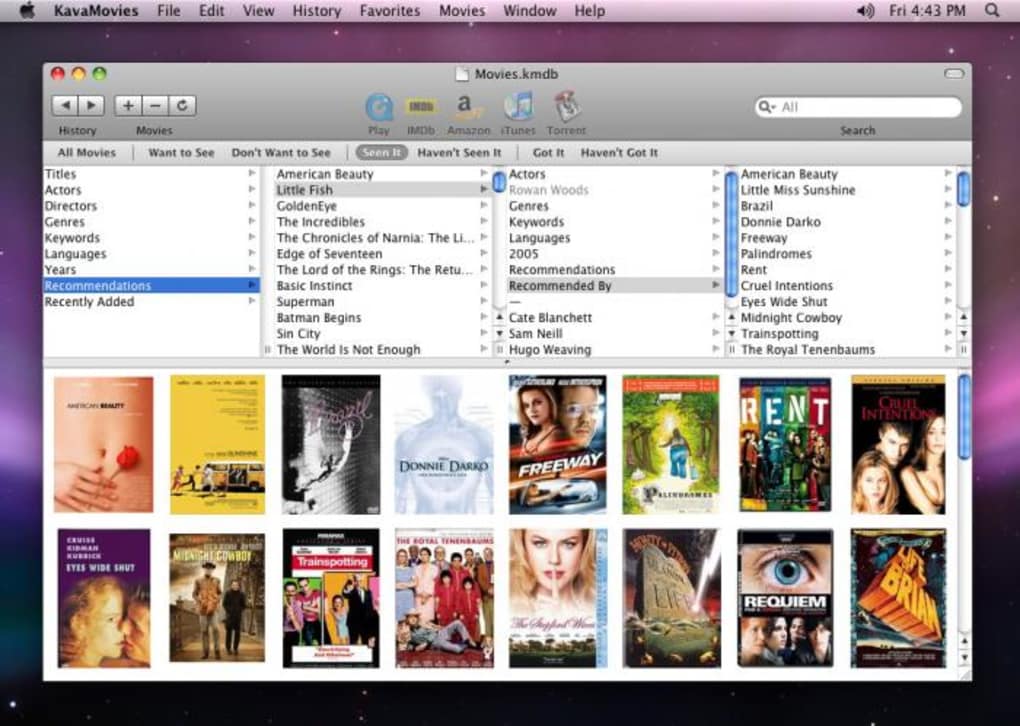
Keeping a personal film library tidy can feel like an endless chore, especially when titles are scattered across hard drives, external disks, and even cloud folders. KavaMovies steps in as a dedicated movie‑management tool designed to bring order, insight, and a dash of fun to every cinephile’s collection. Built with an intuitive interface, KavaMovies lets you catalog movies you’ve watched, those you own but haven’t seen yet, and the titles you still dream of adding. Beyond simple title and director fields, the app supports deep metadata such as actors, genre, release year, MPAA rating, and custom keywords, making it easy to locate that obscure 1970s thriller or a new indie release in seconds. When information is missing, KavaMovies automatically reaches out to Amazon, Wikipedia, and IMDb, pulling cover art, plot summaries, and technical details so your database stays complete without manual entry. The software also syncs smoothly with iTunes for seamless playback and integrates with BitTorrent clients for quick acquisition of legally sourced files. While the filter system is modest—offering a handful of preset categories—it remains functional for most users. The latest 1.5 update introduces searchable custom fields and MPAA rating support, further sharpening its organizational power. If your movie collection is growing beyond the reach of spreadsheets or simple folder structures, KavaMovies provides a secure, free, and regularly updated solution that turns chaos into a beautifully searchable library.
Key Features of KavaMovies
- Comprehensive Metadata Capture: Store titles, directors, cast, genre, year, MPAA rating, and user‑defined keywords.
- Automatic Online Enrichment: Pull missing data from Amazon, Wikipedia, and IMDb with a single click.
- Search Across All Fields: Global search bar indexes titles, actors, custom tags, and even notes.
- iTunes & BitTorrent Integration: Play movies directly from iTunes or launch a torrent download from within the app.
- Custom Field Support (v1.5): Add personal fields such as “Location” or “Loan Status” and search them instantly.
- Recommendation Engine: Write personal notes and recommendations that can be filtered later.
- Export & Import: Backup your library as CSV or JSON and restore on any compatible device.
- Cross‑Platform Design: Native builds for Windows, macOS, and Linux ensure consistent experience.
- Free & Regular Updates: No hidden fees; developers push bug fixes and feature enhancements quarterly.
- Secure Local Storage: All data remains on your machine unless you choose to sync with a cloud service.
Beyond the listed features, KavaMovies shines through its simplicity. The dashboard presents a clean grid view of your collection, while a sidebar offers quick filters for “Watched,” “Unwatched,” “Owned,” and “Want to Watch.” Drag‑and‑drop support lets you rearrange movies or assign them to custom playlists without leaving the main window. For power users, the application includes a hidden “Developer Mode” that reveals raw JSON data for each entry, enabling advanced scripting or bulk edits. The UI is built with modern responsive design principles, ensuring that even on lower‑resolution screens you can comfortably browse thousands of titles without lag. Finally, the community around KavaMovies is active on GitHub, where users share plugins for additional metadata sources, theme packs, and automation scripts—extending the software’s core capabilities far beyond the out‑of‑the‑box experience.
Installation, Usage & Compatibility
Getting KavaMovies up and running is straightforward, regardless of whether you’re on Windows, macOS, or a Linux distribution. Follow these steps for a smooth installation:
Step‑by‑Step Installation Guide
- Visit the official KavaMovies download page and select the installer matching your operating system (Windows EXE, macOS DMG, or Linux AppImage).
- Download the file and, on Windows, run the installer; on macOS, drag the app to the Applications folder; on Linux, make the AppImage executable (`chmod +x KavaMovies.AppImage`) and double‑click.
- During the setup wizard, choose your preferred language, default library location (e.g., a dedicated “Movies” folder), and whether to enable automatic metadata fetching.
- Complete the installation and launch KavaMovies. The first launch will prompt you to create a new library or import an existing CSV/JSON file.
- If you already have a movie collection, use the “Import” button to scan a folder; the app will read file names, generate preliminary entries, and then enrich them using the online lookup feature.
Day‑to‑Day Usage Tips
Once installed, KavaMovies becomes a central hub for managing your films. Begin by adding movies manually or importing a folder. Click the “Search Online” button to fill in missing data—this operation requires an internet connection but runs quickly thanks to parallel API calls. Use the sidebar filters to toggle between “Owned,” “Loaned Out,” or “Wishlist.” The “Recommendations” tab lets you write short reviews that appear when friends view your shared library. For those who enjoy automation, the “Batch Edit” feature lets you apply the same tag (e.g., “Family Night”) to multiple titles at once.
Compatibility Details
KavaMovies supports the following platforms:
- Windows 10, 11 (64‑bit)
- macOS 12 Monterey and later (Intel & Apple Silicon)
- Ubuntu 20.04+, Fedora 34+, and other major Linux distributions (via AppImage)
The application requires a minimum of 2 GB RAM and 200 MB of disk space for the core program; your movie files are stored separately. It runs on both 32‑bit and 64‑bit systems, though the latest builds favor 64‑bit for better performance. For users who rely on external storage (NAS or USB drives), KavaMovies can point its library directory to any mounted volume, ensuring that large collections don’t consume local SSD space. Regular updates are delivered automatically, and you can opt into the “Beta Channel” to test upcoming features before they reach the stable release.
Pros, Cons, FAQ & Final Verdict
Pros
- Free and fully functional without hidden fees.
- Rich metadata support with automatic online enrichment.
- Cross‑platform availability (Windows, macOS, Linux).
- Seamless iTunes and BitTorrent integration.
- Custom fields and searchable keywords introduced in v1.5.
- Lightweight installation and low system requirements.
Cons
- Limited preset filter options; users cannot create custom filter sets.
- No built‑in cloud sync (requires manual export or third‑party solutions).
- Interface, while clean, may feel dated compared to premium commercial alternatives.
- Occasional delay when fetching data from external APIs on slower connections.
Frequently Asked Questions
Is KavaMovies really free?
Yes, KavaMovies is completely free to download and use. All core features are available without a subscription, and updates are provided at no cost.
Can I import an existing movie database?
Absolutely. KavaMovies supports CSV and JSON imports, allowing you to migrate data from spreadsheets, other catalog apps, or previous versions of the software.
Does KavaMovies sync with cloud services like Dropbox or Google Drive?
The application does not have native cloud sync, but you can store the library folder on any synced directory (e.g., Dropbox) and the app will read the data from there.
How does KavaMovies handle duplicate movies?
During import, the software scans titles and hashes to detect duplicates, prompting you to keep the existing entry, merge data, or discard the new copy.
Is there a mobile version of KavaMovies?
Currently KavaMovies is a desktop‑only application. However, the developers have hinted at a companion web app for remote browsing in future releases.
Conclusion & Call to Action
For anyone whose movie library has outgrown simple folder structures, KavaMovies offers a polished, feature‑rich, and absolutely free solution. Its ability to pull missing data automatically, combined with custom fields and solid integration with iTunes and BitTorrent, makes daily movie management a breeze. While the filter system could be more flexible and native cloud sync is absent, these shortcomings are outweighed by the app’s stability, cross‑platform support, and active development community. If you’re ready to bring order to your collection, streamline recommendations, and keep track of loans to friends, download KavaMovies today and experience a more organized cinematic world.
Guides & Tutorials for KavaMovies
How to install KavaMovies
- Click the Preview / Download button above.
- Once redirected, accept the terms and click Install.
- Wait for the KavaMovies download to finish on your device.
How to use KavaMovies
This software is primarily used for its core features described above. Open the app after installation to explore its capabilities.
User Reviews for KavaMovies 0
No reviews found





.webp)